
By Hiran, CIMA (ACMA, CGMA). 8+ years reconciling accounts across Australia, the UK, the US and Canada
“Reconcile your AR and AP” gets said as if it’s one task. It isn’t. Reconciling accounts receivable means checking that what customers owe you, according to your invoicing system, agrees with what your balance sheet says they owe you. Reconciling accounts payable is the mirror image on the vendor side. They’re two separate checks, they fail for different reasons, and in every set of books I’ve cleaned up where AR or AP had drifted from the general ledger, the cause was almost never a system bug. It was a transaction that bypassed the normal invoice-or-bill workflow.
This guide walks through both reconciliations properly: what report to run in QuickBooks Online or Xero, what it should equal, and exactly what to check when it doesn’t. It includes a worked example built from a fictional print shop’s actual month-end mess, a distinction most guides skip entirely, the difference between reconciling to your own ledger and reconciling to what a vendor or customer says you owe, and a country-by-country look at what happens to GST, VAT, HST or sales tax when you finally write off a receivable that’s never getting paid.
What Reconciling AR and AP Actually Means
Accounts receivable reconciliation compares the total of every open customer invoice, as listed on an aging report, to the Accounts Receivable balance on your balance sheet, as of the same date. Accounts payable reconciliation does the same thing on the vendor side: total open bills compared to the Accounts Payable balance on the balance sheet. In both cases, if the two numbers match, the subledger (the detailed, customer-by-customer or vendor-by-vendor record) agrees with the general ledger (the single summary number that feeds your financial statements). If they don’t match, something has affected one without affecting the other, and that’s almost always a transaction that touched the AR or AP account directly, rather than going through Receive Payment, Pay Bills, an invoice, or a bill.
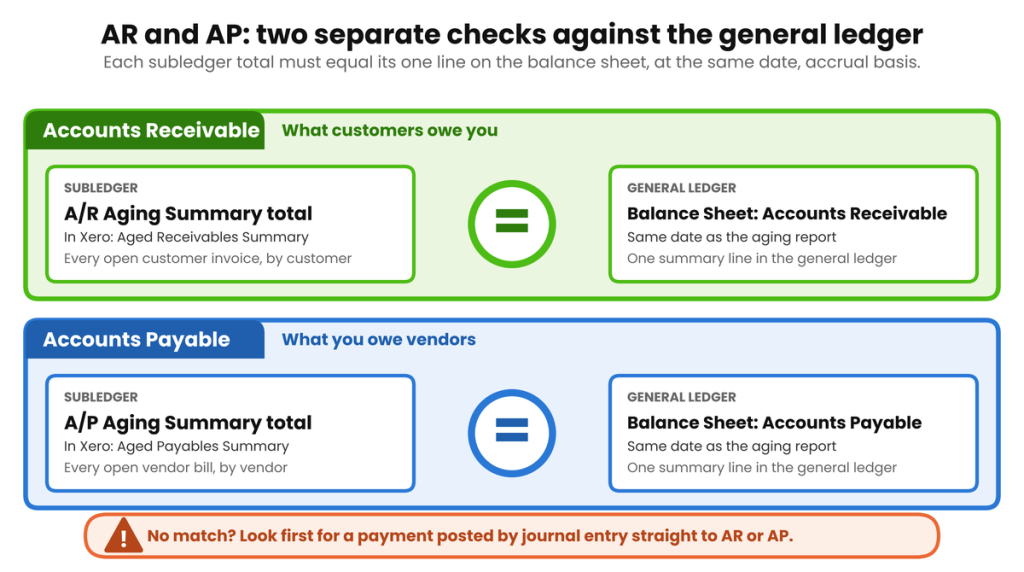
Accounts receivable and accounts payable each get compared to the general ledger separately: they’re not one reconciliation wearing two names.
How This Differs From a Bank Reconciliation
A bank reconciliation compares your books to an external statement your bank produced. AR and AP reconciliation compares two things inside your own accounting system: a detailed report and a summary balance that should, mechanically, always agree if every transaction went through the right screen. See our guide to How to Reconcile a Bank Statement, Step by Step for that separate process. The two are related, a customer payment that never gets recorded correctly can throw off both, but they’re checking different things and one being clean says nothing about the other.
Reconciling Accounts Receivable, Step by Step
- Pick a date, usually month end, and run the aging report: A/R Aging Summary in QuickBooks Online, Aged Receivables Summary in Xero. Run it on an accrual basis; a cash-basis version will show a different, and for this purpose useless, number.
- Run the Balance Sheet for the same date, also on an accrual basis, and note the Accounts Receivable line.
- Compare the aging report’s total to the balance sheet figure. If they match to the cent, the reconciliation is done, record that you checked it and move on.
- If they don’t match, check for a journal entry posted directly to the Accounts Receivable account during the period. This is the single most common cause, and both platforms let you filter a Journal report to one account to find it quickly.
- If there’s no stray journal entry, check for an unapplied customer payment or credit memo: money received but never matched to the invoice it was for, which affects the two reports differently depending on how your software totals unapplied amounts per customer.
- Once the totals agree, look at the aging buckets themselves, every month, not just at year end, so a bad debt decision happens while collection is still realistically possible. Anything sitting in the 90-plus-days column is no longer a reconciliation question. It’s a collections decision, and possibly a bad debt write-off (covered below).
Reconciling Accounts Payable, Step by Step
- Run the A/P Aging Summary (QuickBooks Online) or Aged Payables Summary (Xero) as of the same date, on an accrual basis.
- Run the Balance Sheet for the same date and note the Accounts Payable line.
- Compare the two totals. A match means the subledger and the general ledger agree, but see the section below on why that’s not the only check worth doing.
- If they don’t match, check first for a bill payment recorded through a journal entry instead of Pay Bills. It reduces the general ledger balance without marking the underlying bill as paid, so the bill keeps sitting open on the aging report.
- Check next for a vendor credit that was entered but never applied to a specific bill, which behaves like the unapplied-payment problem on the AR side.
- Once the totals agree, separately confirm the amount against the vendor’s own statement for your top five suppliers each month, at minimum. An internal match doesn’t guarantee external accuracy, which is the whole point of the next section.
A Worked Example: Rowan & Birch Print Co.
Rowan & Birch Print Co., a small print and signage shop in Ontario, closed its books for September 2026 with both AR and AP out of balance, for two completely different, very ordinary reasons.
The Accounts Receivable Mismatch
The A/R Aging Summary totalled $19,650.00 across all customers. The Balance Sheet showed Accounts Receivable of $18,420.00, a $1,230.00 gap.
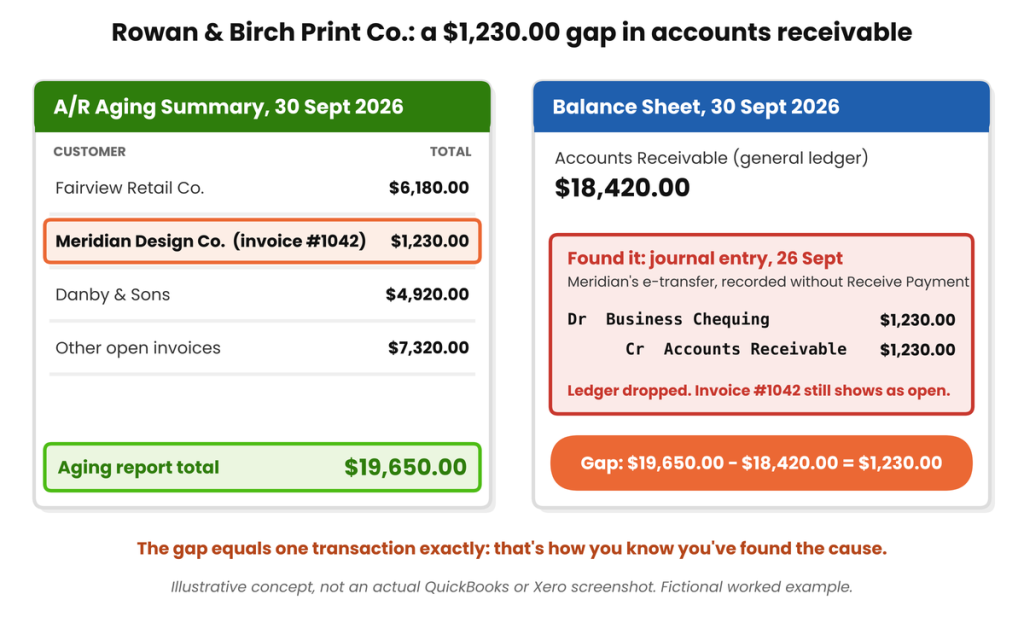
Illustrative concept, not an actual QuickBooks or Xero screenshot. Figures from the Rowan & Birch worked example.
The cause: on 26 September, Rowan & Birch received a $1,230.00 e-transfer from Meridian Design Co. against invoice #1042. Instead of using Receive Payment, the payment was recorded as a journal entry, debit Business Chequing, credit Accounts Receivable, both for $1,230.00. That journal entry reduced the general ledger AR balance immediately. But invoice #1042 was never marked paid, so it kept sitting on Meridian’s aging as an open invoice. The fix: reverse the journal entry, then apply the $1,230.00 through Receive Payment matched to invoice #1042. Both reports move back into agreement, and, just as usefully, Meridian’s customer record now correctly shows a zero balance instead of an invoice that looks overdue when it’s actually been paid.
The Accounts Payable Mismatch
| Account | As reported | Amount |
| A/P Aging Summary (open bills, by vendor) | Subledger | $11,190.00 |
| Accounts Payable, Balance Sheet, 30 Sept 2026 | General ledger | $10,210.00 |
| Difference | $980.00 |
Same mechanism, mirrored: on 22 September, a $980.00 bank transfer paying bill #772 from Castlebridge Ink & Toner was recorded as a journal entry (debit Accounts Payable, credit Business Chequing) instead of through Pay Bills. The general ledger AP balance dropped by $980.00, but bill #772 never got marked as paid, so it’s still sitting open on Castlebridge’s aging, a $980.00 gap that lands exactly on the journal entry amount, which is usually how you confirm you’ve found the actual cause rather than a coincidence.
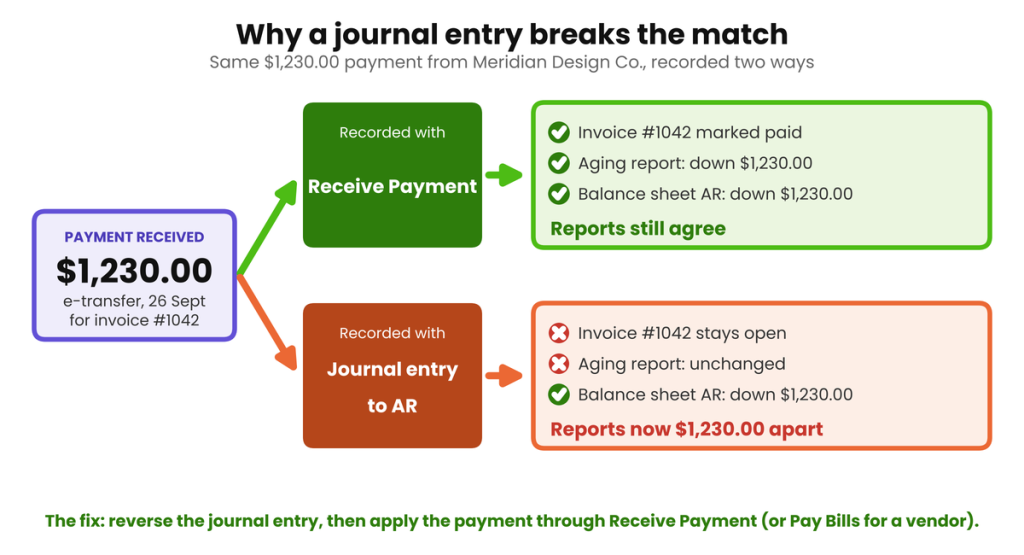
| A quick way to catch this before it compounds: Run a Journal Entries report filtered to your A/R and A/P accounts at month end. Any line touching either account should almost always come from an invoice, bill, or payment transaction, not a manual journal entry. A journal entry hitting A/R or A/P directly is the single most common cause of a subledger-vs-balance-sheet mismatch, and it’s easy to filter for once you know to look. |
Two Different Reconciliations Hiding Under One Name
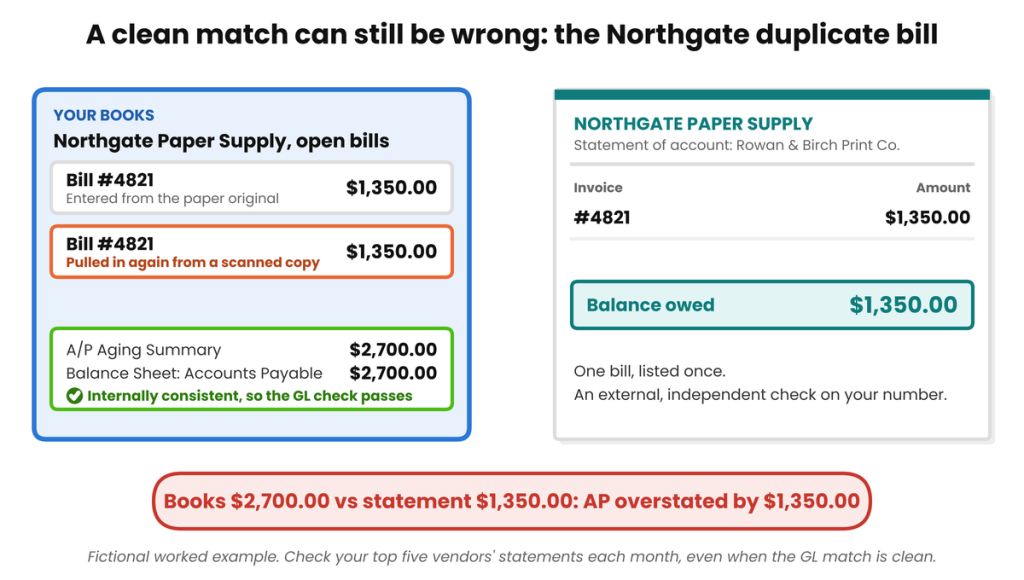
Matching your subledger to your general ledger only proves the two are internally consistent with each other. It says nothing about whether the number itself is right. That distinction matters more on the payable side, where a duplicate bill can sail straight through a GL-matching check.
| What’s compared | Result | What it tells you |
| A/P Aging Summary vs. Balance Sheet AP | Both show $2,700.00 for Northgate Paper Supply | Internally consistent, but doesn’t confirm the amount is correct |
| Northgate’s own vendor statement | Shows $1,350.00 owed | Bill #4821 was entered twice, once manually, once from a duplicate scanned copy, and both postings agree with each other perfectly |
Northgate’s paper invoice was entered once from the original paper copy and again from a duplicate scan pulled in by an automated capture tool a couple of days later. Both entries went through Enter Bill correctly, so the A/P Aging Summary and the Balance Sheet agree with each other down to the cent, a clean GL-matching reconciliation that’s nonetheless overstating what’s actually owed by $1,350.00. The only way to catch this is to periodically request statements from your top five vendors, even when the internal reconciliation is clean, and compare them against what your books say you owe. It’s a genuinely different exercise from the subledger-to-ledger check above, and worth doing on its own schedule, not as an assumed side effect of it.
What to Do With Old Receivables You’ll Never Collect
Once a customer balance is genuinely uncollectible, not just late, but unlikely to ever be paid despite reasonable collection efforts, it needs to come off the books as a bad debt, and in every one of these four countries that has tax and indirect-tax consequences most reconciliation guides skip entirely.
One rule holds everywhere first: a business on cash-basis accounting generally can’t claim an income-tax bad debt deduction for an unpaid invoice, because that income was never recognised in the first place. There’s nothing to reverse. Only accrual-basis businesses, which recognised the revenue when the invoice was raised, get a deduction when it turns out that revenue is never coming.
| Country | Waiting period / condition | Key requirement | Indirect-tax relief |
| Australia | GST adjustment available once overdue 12+ months (income tax deduction has no fixed period) | Debt included in assessable income; determined genuinely unrecoverable; written off in writing before year end; accrual-basis reporting | Decreasing GST adjustment on your BAS, where the original sale was taxable and GST was already remitted |
| United Kingdom | Unpaid 6+ months from the later of the due date or supply date | VAT already paid to HMRC; debt written off in a separate bad debt account; price not overstated; debt not sold on | VAT bad debt relief, claimed within 4 years and 6 months of the qualifying date, per VAT Notice 700/18 |
| United States | No fixed waiting period: worthlessness must be demonstrable | Accrual-basis only (IRC §166); genuine debtor-creditor relationship; documented collection attempts; wholly or partly worthless | No federal sales-tax equivalent; check your state revenue department, as some states allow a sales-tax bad-debt credit |
| Canada | No fixed waiting period: must be evidently uncollectible (bankruptcy counts automatically) | Reasonable collection efforts documented in writing; debt written off in your books; aging the receivable alone isn’t sufficient proof | GST/HST bad debt adjustment on your return, or alternatively issue the customer a credit note |
This table is a starting point for the conversation with your accountant, not a substitute for one. The exact claiming mechanics (which BAS label, which VAT return box, which GST/HST return line) depend on your specific reporting method and are worth confirming before you file, particularly since three of the four jurisdictions require the write-off to be documented in a specific way before the deduction or adjustment is available at all.
QuickBooks Online vs. Xero: Where to Find These Reports
| What you need | QuickBooks Online | Xero |
| Customer aging total | Reports → A/R Aging Summary | Business → Invoices → Aged Receivables Summary |
| Vendor aging total | Reports → A/P Aging Summary | Business → Bills to pay → Aged Payables Summary |
| Per-customer or per-vendor detail | Customer Balance Detail / Vendor Balance Detail | Account Transactions, filtered by contact |
| Finding a stray journal entry | Reports → Journal, filtered to the A/R or A/P account | Accounting → Advanced → Journal report, filtered to the account |
How Often Should You Reconcile AR and AP?
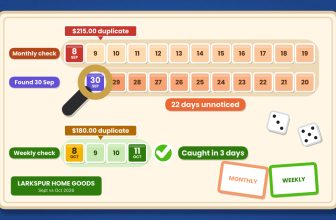
Monthly, at minimum, as part of the routine covered in our Month-End Close Checklist for Small Business. It’s Step 3 in that process, sitting between the bank reconciliation and posting adjusting entries. A business invoicing or billing more than roughly fifty transactions a month is usually better served checking weekly or biweekly, since a mismatch found four weeks late means four weeks of transactions to search through instead of one week’s worth.
Where This Actually Goes Wrong
Most AR and AP mismatches come down to one of two things: a habit that causes the problem in the first place, or not knowing where to look once it’s already happened. Here’s both, together. For a broader look at diagnosing a discrepancy by its size and shape, our guide to Common Reconciliation Discrepancies, and How to Fix Them covers the general method; what follows here is the AR/AP-specific version of it.
The Habits Worth Breaking
- Recording a customer payment or vendor bill payment through a journal entry instead of Receive Payment or Pay Bills: the single most common cause of a subledger-vs-ledger mismatch.
- Treating a clean subledger-to-balance-sheet match as proof the numbers are correct, without ever checking a vendor statement or customer confirmation.
- Leaving unapplied customer payments or vendor credits sitting unmatched for months, so nobody can tell at a glance which invoices are genuinely still open.
- Writing off a bad debt in the accounting software without also handling the GST, VAT, HST or sales-tax adjustment it typically triggers.
- Letting a subcontractor or junior team member post journal entries to AR or AP without a second set of eyes reviewing them before month end.
When AR or AP Won’t Match
- Confirm both reports are run for the same date and the same accounting basis, accrual, not cash: this alone explains a surprising number of “mismatches” that aren’t really mismatches.
- Filter a Journal report to the AR or AP account for the period and look for any line that isn’t tied to an invoice, bill, or payment transaction.
- Check for unapplied customer payments (QuickBooks Online’s Community help documents this specifically) or unapplied vendor credits sitting on the account.
- If the difference matches a specific transaction amount exactly, that’s almost certainly your answer: don’t keep searching once you’ve found a number that reconciles the gap precisely.
- If the totals agree but something still feels off, reconcile your largest vendor or customer accounts against their own statements directly: a clean internal match doesn’t rule out a duplicate entry.
AR/AP Reconciliation Checklist
| ☐ | Run the A/R Aging Summary (or Aged Receivables Summary) as of the reconciliation date |
| ☐ | Run the A/P Aging Summary (or Aged Payables Summary) for the same date |
| ☐ | Run the Balance Sheet for the same date, on an accrual basis |
| ☐ | Compare both aging totals to their matching balance sheet lines |
| ☐ | If either doesn’t match, check for a journal entry posted directly to AR or AP |
| ☐ | Check for unapplied customer payments or vendor credits |
| ☐ | Review aging buckets for anything 90+ days overdue |
| ☐ | Spot-check your largest vendors’ statements against your books |
| ☐ | Document any bad debt write-off decision in writing, with the date |
| ☐ | Apply the correct GST/VAT/HST/sales-tax adjustment for any bad debt written off |
| ☐ | File supporting documentation for the period |
FAQs
What’s the difference between reconciling accounts receivable and reconciling a bank account?
A bank reconciliation compares your books to an external statement from your bank. AR reconciliation compares two internal reports to each other, a customer-by-customer aging total and the Accounts Receivable balance on your balance sheet, that should always agree if every transaction went through the invoicing and payment workflow correctly.
How often should I reconcile AR and AP?
Monthly at minimum, as part of a month-end close. Businesses with higher transaction volume, roughly fifty or more invoices or bills a month, are usually better off checking weekly or biweekly, since problems are far easier to trace while they’re recent.
Why doesn’t my A/R aging report match my balance sheet?
The most common cause by a wide margin is a journal entry posted directly to the Accounts Receivable account: a payment or adjustment that should have gone through Receive Payment or a credit memo instead. Unapplied customer payments and mismatched report dates or accounting bases are the next most common causes.
Can I write off a customer’s unpaid invoice as a bad debt?
Generally yes, once you’ve made reasonable collection efforts and genuinely believe it won’t be paid, but the exact conditions differ by country, and cash-basis businesses typically can’t claim an income tax deduction for it since the income was never recognised in the first place. See the country comparison table above, and confirm specifics with your accountant.
What happens to GST, VAT or sales tax when I write off a bad debt?
In Australia, the UK and Canada, writing off a genuinely bad debt typically lets you claim back the GST, VAT or HST you already remitted on that sale, subject to each country’s specific conditions and waiting periods. In the US, there’s no federal equivalent, though some states offer a sales-tax bad-debt credit, check with your state revenue department.
Does QuickBooks Online or Xero reconcile AR and AP automatically?
Neither reconciles them for you in the sense of confirming the numbers are correct: both will happily let a journal entry post directly to AR or AP without any warning. What they do provide is the aging reports and balance sheet you need to check it yourself, which is the process this article walks through.
What’s the difference between reconciling to the general ledger and reconciling to a vendor statement?
Reconciling to the general ledger only confirms your subledger and your books agree with each other internally: it won’t catch a duplicate bill that was entered correctly twice, since both entries agree with each other perfectly. Reconciling to the vendor’s own statement checks the number against an external, independent source, which is the only way to catch that kind of error.
Rowan & Birch’s $1,230.00 and $980.00, Traced to One Habit
Rowan & Birch Print Co.’s $1,230.00 AR gap and $980.00 AP gap both came from the same habit: recording a payment through a journal entry instead of the proper Receive Payment or Pay Bills screen. Both were found the same way: comparing an aging report to the balance sheet and tracing the exact difference back to a dated transaction. The Northgate duplicate bill is the reminder that a clean match between your subledger and your general ledger only proves internal consistency, not accuracy. Checking a vendor’s own statement now and then is a genuinely different, and necessary, exercise. Do both regularly, and AR and AP stop being a source of surprises at tax time.
| About the Author Hiran is a CIMA-qualified bookkeeper (ACMA, CGMA) with 8+ years of experience reconciling accounts, including multi-entity and intercompany reconciliations, for small businesses across Australia, the UK, the US and Canada. He runs a bookkeeping practice working directly in QuickBooks Online and Xero for clients in hospitality, e-commerce, agencies and professional services. |







[…] are subledgers with their own reconciliation rhythm too, not just bank and card balances: see our guide to Reconciling Accounts Receivable and Payable for how often to check those […]