
By Hiran, CIMA (ACMA, CGMA). 8+ years reconciling accounts across Australia, the UK, the US and Canada
Most small businesses don’t have a formal month-end close, they have a vague sense that the books should be “sorted out” at some point before the next month gets away from them. The trouble with that approach isn’t laziness, it’s order. Reconciling accounts receivable before the bank account is reconciled, or running the profit and loss report before adjusting entries are posted, produces numbers that look finished but aren’t. A proper close isn’t about doing more work; it’s about doing the same handful of tasks in an order that means each one only has to be done once.
This is the checklist I run every month, for every client, adapted slightly for whichever of QuickBooks Online or Xero they use. It’s built around a fixed order of operations, a worked example showing what a typical month’s adjusting entries actually look like, and the specific feature in each platform that stops last month’s numbers from quietly changing after you’ve already reported on them. Set a recurring calendar reminder a few business days after month-end to run it, giving outstanding bank feed items and supplier invoices time to arrive first.
What “Closing the Books” Actually Means
Closing the books for a month means reaching a point where every account is reconciled, every adjustment that belongs in that period has been posted, the resulting financial statements have been reviewed and make sense, and the period is then locked so nothing dated in it can change without a deliberate, visible decision to unlock it. Locking it is the step most small businesses skip, and it’s the reason the same month’s numbers sometimes look different when you pull them up three months later.
A close doesn’t have to be elaborate to be real. For a single-entity small business with modest transaction volume, the whole process below typically takes half a day to a day once it’s routine, most of that time going to investigating anything unusual, not to the mechanical steps themselves.
The Month-End Close Checklist, Step by Step
Run these in order. Each step assumes the ones before it are already done: reviewing financial statements before adjusting entries are posted, for instance, means reviewing numbers you’re about to change anyway.
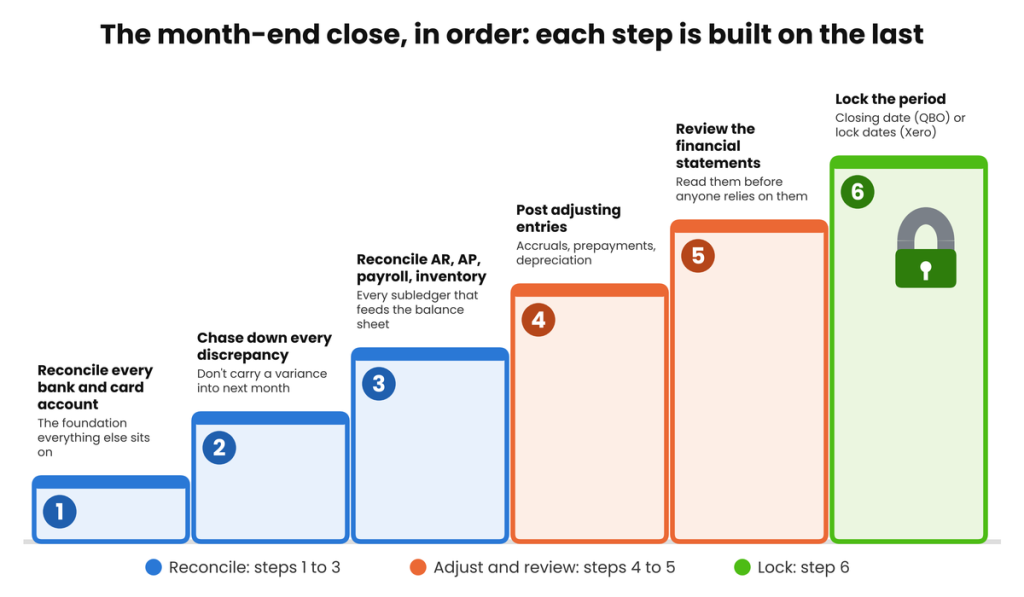
The month-end close order of operations: six stages, each one built on the last.
Step 1: Reconcile Every Bank and Card Account
Every bank account and credit card the business holds needs to be reconciled against its statement before anything else happens. This is the foundation the rest of the close sits on, if it’s wrong, every later step inherits the error. This guide on How to Reconcile a Bank Statement, covers the full process.
Step 2: Chase Down Every Discrepancy Found
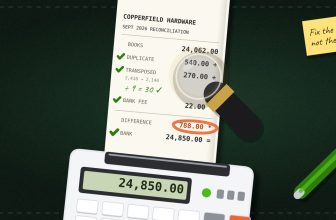
If Step 1 didn’t balance cleanly, resolve it now, not later. Carrying an unexplained variance into next month means starting the next close already behind. Our guide to Common Reconciliation Discrepancies, and How to Fix Them covers the diagnostic process in detail: duplicate transactions, transposition errors, and unrecorded fees account for the large majority of what shows up here.
Step 3: Reconcile Every Subledger: AR, AP, Payroll, Inventory
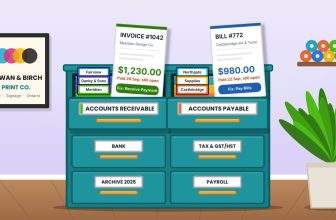
With the bank accounts settled, move to the subledgers that feed the balance sheet. Review aged accounts receivable for anything that should have been collected or written off, and accounts payable to confirm every accrued but unpaid expense is captured. Our guide to Reconciling Accounts Receivable and Payable (/reconcile-accounts-receivable-and-payable) covers the full method for both. Reconcile payroll liabilities, superannuation, PAYG, tax withholdings, or their equivalents, against what’s actually been remitted. If the business holds inventory, confirm the on-hand quantity and value are current. Skipping any one of these means the balance sheet you produce at the end of this process is incomplete, even if the bank reconciliation was perfect.
If the business has related entities, this is also where intercompany balances get reconciled: see our guides on What Is Intercompany Reconciliation, and, for three or more entities, Reconciling Multi-Entity Group Accounts.
Step 4: Post Month-End Adjusting Entries
This is where accrual accounting actually happens: recognising expenses and income in the period they relate to, rather than the period cash happened to move. The most common adjusting entries for a small business are accrued expenses (a cost incurred but not yet invoiced), prepayment amortisation (spreading a lump-sum payment across the months it covers), and depreciation (spreading the cost of an asset across its useful life). It’s worth keeping a running note of recurring adjusting entries, since the same accrual or amortisation often repeats every month with only the amount changing. A worked example follows below.
Step 5: Review the Financial Statements
Pull the profit and loss, balance sheet, and, if the business tracks it, a cash flow statement, and actually read them before calling the month done. Compare this month to last month and to the same month last year where that comparison is meaningful, a number only looks unusual next to something. A figure that’s moved sharply without an obvious reason is worth five minutes of investigation now, while the transactions behind it are still fresh, rather than an hour of investigation at year end when nobody remembers why.
Step 6: Lock the Period
Once the financial statements look right, lock the period so nothing dated within it can be changed without a deliberate decision to unlock it first. Both QuickBooks Online and Xero support this, with slightly different mechanics, covered in full in the next section.
QuickBooks Online vs. Xero: How Each Platform Locks a Closed Period
Locking the period is the step competitor checklists most often skip or only half-cover, usually mentioning QuickBooks Online’s closing date without any Xero equivalent. Both platforms genuinely support this, and it’s worth understanding the small but meaningful differences between them.
| Platform | How it works | Security options |
| QuickBooks Online | Settings → Account and Settings → Advanced → Accounting → turn on “Close the books” and set a closing date. Once set, transactions dated on or before that date are protected. | Choose either “allow changes with a warning” or “require a password for changes”, the password option is the stronger of the two and the one we recommend for anyone other than a sole operator. |
| Xero | Settings → Lock Dates. Two separate dates can be set: a standard lock date and an advisor lock date. | A standard lock date stops regular users from adding, editing, or approving anything dated on or before it, but still allows an advisor-level user through. An advisor lock date stops everyone, advisors included, set both to the same date for the strongest protection. |
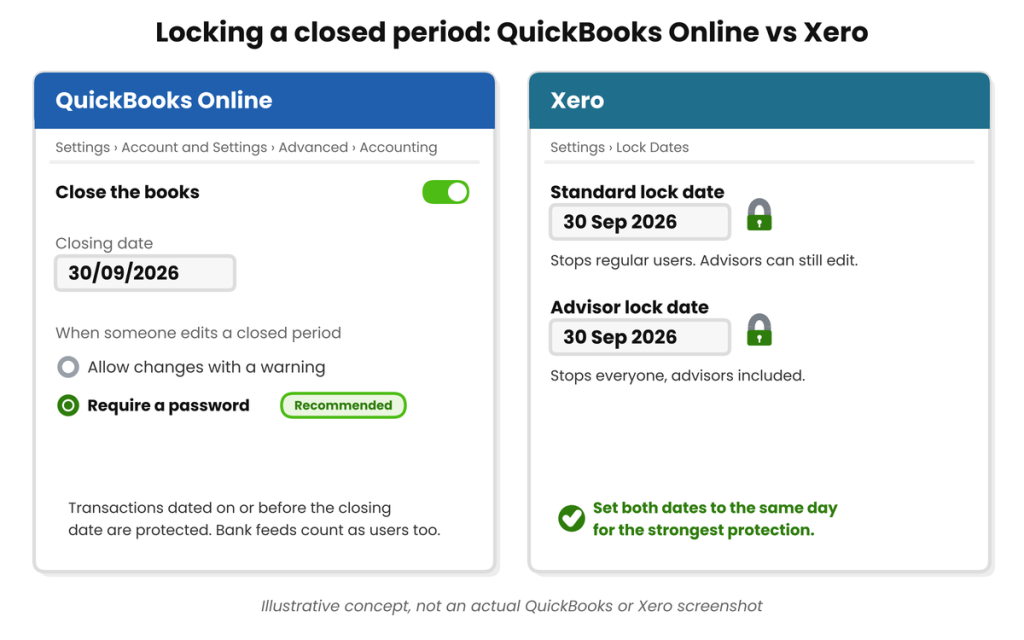
Illustrative comparison of locking a closed period in each platform. Not an actual QuickBooks or Xero screenshot.
One practical note either way: connected apps and bank feeds are treated the same as a human user by both platforms, a locked period stays locked even against an automatic sync trying to push a transaction into it, which is exactly the protection you want.
A Worked Example: One Month’s Adjusting Entries
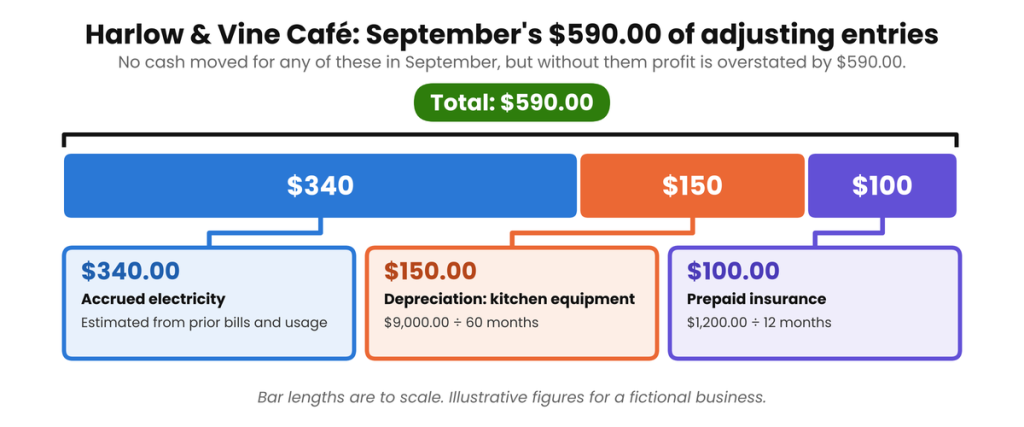
Here’s what Step 4 actually looks like in practice, using a fictional business, Harlow & Vine Café, closing its books for September 2026. Three ordinary adjusting entries, none of them unusual, together shift the month’s reported profit by a meaningful amount:
| Adjustment | Basis | Amount |
| Accrued electricity: used in September, invoice not yet received | Estimated from prior bills and September usage | $340.00 |
| Prepaid insurance: 12-month policy paid in January, amortised monthly | $1,200.00 ÷ 12 months | $100.00 |
| Depreciation: kitchen equipment, straight-line over 5 years | $9,000.00 cost ÷ 60 months | $150.00 |
| Total adjusting entries for September | $590.00 |
Without these three entries, Harlow & Vine’s September profit and loss would overstate profit by $590.00, a modest amount for one month, but the kind of gap that compounds into a genuinely misleading annual figure if it’s skipped every month rather than just once. None of these entries involve cash moving in September; that’s exactly the point of accrual-based adjusting entries, and exactly why Step 4 has to happen before Step 5’s review, not after.
| A quick sanity check for accrued expenses: If you’re estimating an accrued cost because the invoice hasn’t arrived yet, compare your estimate to the actual invoice once it does turn up next month. A consistent pattern of over- or under-estimating by more than 10-15% is worth adjusting your estimation method for, rather than accepting as normal variance. |
Where This Actually Goes Wrong
Most month-end closes that go off the rails fail for one of two reasons: a habit that causes the same problem every month, or a specific blocker on the day that stops the close from finishing. Here’s both, together.
The Habits Worth Breaking
- Reviewing financial statements before adjusting entries are posted: the numbers look final but aren’t, and any conclusions drawn from them need to be redone.
- Treating the close as finished once the bank reconciles, without touching AR, AP, payroll, or adjusting entries at all.
- Never setting a closing date or lock date, leaving every prior month permanently editable, and permanently at risk of a silent change.
- Using the warning-only option in QuickBooks Online (or leaving Xero’s advisor lock date unset) for a business with more than one person entering transactions.
- Guessing at accrued expenses without ever comparing the estimate to the actual invoice once it arrives, so a bad estimation habit never gets corrected.
- Doing the close in a different order every month: inconsistency is what turns a fifteen-minute routine task into an hour of re-checking work you’ve already done.
When the Close Won’t “Close”
- If the bank reconciliation won’t balance, stop and resolve it before moving to any later step: see Step 2 and our discrepancy troubleshooting guide for the diagnostic process.
- If accounts receivable or payable totals look wrong, check for a payment applied to the wrong invoice or a duplicate invoice before assuming a more complex cause.
- If the profit and loss looks materially different from what you expected, check first whether an adjusting entry was missed or duplicated: this is a far more common cause than an actual change in the business’s trading.
- If you can’t set a closing date or lock date, confirm your user role has the necessary permission, in both platforms, this is typically restricted to an admin or advisor-level user, not every standard user.
- If a transaction needs correcting in an already-locked period, unlock deliberately, make the single correction, and re-lock immediately, don’t leave the period open “for now” while you get to it.
Month-End Close Checklist
| ☐ | Reconcile every bank and credit card account |
| ☐ | Resolve any reconciliation discrepancy found, don’t carry it into next month |
| ☐ | Review aged accounts receivable and follow up or write off as needed |
| ☐ | Review accounts payable and confirm all accrued expenses are captured |
| ☐ | Reconcile payroll liabilities against amounts actually remitted |
| ☐ | Confirm inventory quantities and values are current (if applicable) |
| ☐ | Reconcile intercompany balances (if applicable) |
| ☐ | Post accrued expense, prepayment, and depreciation adjusting entries |
| ☐ | Review the profit and loss, balance sheet, and cash flow statement |
| ☐ | Compare this month to last month and the same month last year |
| ☐ | Set or confirm the closing date (QuickBooks Online) or lock dates (Xero) |
| ☐ | File or store supporting documentation for the month |
FAQs
How long should a month-end close take for a small business?
For a single-entity small business with modest transaction volume and reasonably current books throughout the month, half a day to a day is typical once the process is routine. Most of that time goes to investigating anything unusual, not the mechanical steps themselves, a business that lets bank feeds and invoicing lapse during the month will always take longer to close it.
What’s the difference between a soft close and a hard close?
A hard close is the full process above, ending with the period locked. A soft close covers the same reconciliation and review work but stops short of locking the period, useful for an interim management-reporting cut-off, but it should still be followed by a hard close once the month is genuinely final.
Do I need to post adjusting entries every month, or only at year end?
Every month, if you want monthly figures to be meaningful. Skipping accruals and depreciation for eleven months and catching up at year end means every monthly report along the way understated or overstated real performance, and if you’re using those monthly numbers to make decisions, they need to be right monthly, not just annually.
What happens if I need to change something in a locked period?
Both platforms allow it, but only for a user with the right permission, and both will prompt for confirmation (or a password, in QuickBooks Online’s case). Make the specific correction needed, then re-lock the period immediately rather than leaving it open.
Can I use the same closing date across multiple entities?
Each QuickBooks Online company file or Xero organisation sets its own closing date or lock dates independently, there’s no group-wide setting. For a multi-entity business, it’s worth locking every entity on the same day each month as a matter of process, even though the setting itself is per-entity.
Should bookkeepers or business owners have access to unlock a closed period?
In most small businesses, this should sit with whoever is responsible for the accounts, typically the bookkeeper or accountant, rather than every user who can enter transactions. QuickBooks Online’s password option and Xero’s advisor lock date both exist specifically to create that separation.
What’s the single most common reason a small business’s month-end close takes longer than it should?
Incomplete records during the month itself: unrecorded cash expenses, missing supplier invoices, or a bank feed that hasn’t been reviewed in weeks, rather than anything wrong with the close process itself. A close is only ever as fast as the bookkeeping that happened before it.
Harlow & Vine’s $590.00, in the Right Order
Harlow & Vine Café’s $590.00 in September adjusting entries didn’t require any unusual accounting knowledge, just three ordinary entries, posted in the right order, before anyone looked at the profit and loss. That’s the whole discipline behind a month-end close: not extra work, but the same handful of tasks done in a fixed sequence, followed by a lock that keeps the result from quietly changing later. Do that consistently and closing the books stops being a monthly scramble and starts being routine.
| About the Author Hiran is a CIMA-qualified bookkeeper (ACMA, CGMA) with 8+ years of experience reconciling accounts, including multi-entity and intercompany reconciliations, for small businesses across Australia, the UK, the US and Canada. He runs a bookkeeping practice working directly in QuickBooks Online and Xero for clients in hospitality, e-commerce, agencies and professional services. |






[…] at minimum, as part of the routine covered in our Month-End Close Checklist for Small Business. It’s Step 3 in that process, sitting between the bank reconciliation and posting adjusting […]