
By Hiran, CIMA (ACMA, CGMA). 8+ years reconciling accounts across Australia, the UK, the US and Canada
Every bookkeeper knows the feeling: you tick the last box, hit reconcile, and the software tells you it’s out by some oddly specific number, $270.00, $22.00, $788.00, instead of the tidy zero you were expecting. It’s rarely a sign that something has gone badly wrong. In the overwhelming majority of cases it’s one of a small, predictable handful of causes, and the fastest way through it is a process of elimination rather than scrolling up and down the transaction list hoping something jumps out.
This guide walks through the discrepancies I see most often in real small-business reconciliations, how to diagnose which one you’re looking at from the size and shape of the difference alone, and exactly how to fix each one in QuickBooks Online and Xero. It assumes you already know how to reconcile a bank account in the first place. If you need that groundwork first, our companion guide on bank reconciliation, covers the full step-by-step process.
Why Your Reconciliation Doesn’t Balance: The Real Causes
Before diagnosing anything, it’s worth separating timing differences from genuine discrepancies, because they look similar and are fixed completely differently. A cheque you’ve written but the supplier hasn’t banked yet, or a deposit sitting in transit over a weekend, will show up as a difference between your book balance and the bank statement, but it isn’t an error. It resolves itself in a day or two once the item clears, and force-fixing it will just create a real discrepancy where none existed.
Once timing differences are ruled out, an actual discrepancy in your books almost always comes down to one of these five things:
- A duplicate transaction: the same payment or deposit entered, imported, or synced twice.
- A missing transaction: something the bank processed that never made it into your books at all.
- A transposition or data-entry error: the right transaction, but with two digits swapped or a decimal point in the wrong place.
- An unrecorded bank fee, interest charge, or foreign-exchange adjustment: something the bank already knows about that your books don’t yet.
- A change to an opening balance: usually from editing a transaction in an already-reconciled prior period.
Miscategorisation deliberately isn’t on that list. Recording a genuine expense to the wrong account, office supplies instead of equipment, say, is a real error worth fixing, but it doesn’t create a reconciliation discrepancy, because the amount still left the bank account correctly and was recorded for the correct amount. It’s a profit-and-loss accuracy problem, not a balancing problem. I’ll come back to this because it trips up a lot of people who assume any weird number must mean they miscoded something.
The Discrepancy Diagnosis Checklist
Here’s the order I actually work through, every time, before touching a single transaction. The one thing not to do is force it: adding an adjustment entry for the exact difference, without knowing what actually caused it, makes the number disappear from the report without fixing anything, and the real cause usually resurfaces later, harder to trace. Running the checklist below in order matters instead, because steps 2 through 4 are diagnostic tests you can do in about thirty seconds using nothing but a calculator, and they narrow down what you’re looking for before you start hunting through the ledger.
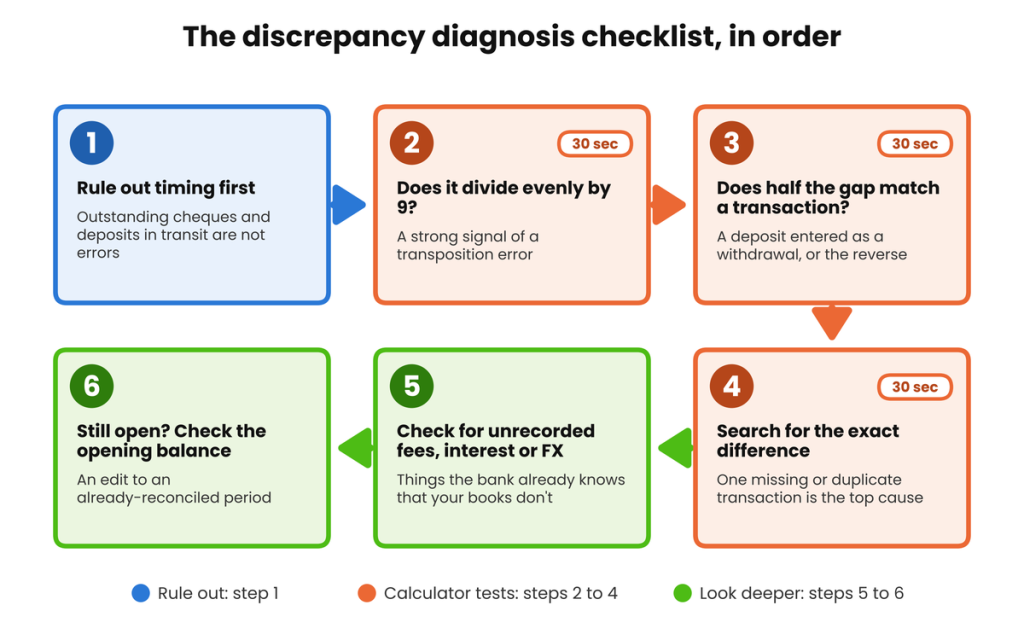
The discrepancy diagnosis checklist. Work through it in order before searching transaction-by-transaction.
The Two Diagnostic Tests Worth Knowing by Heart
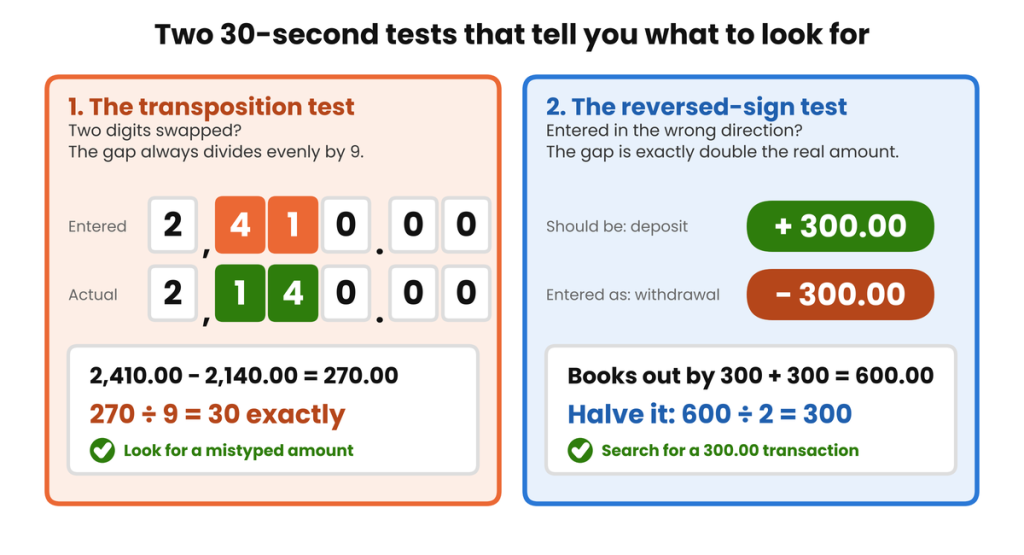
The transposition test: if you swap two adjacent digits in a number, entering $2,410.00 instead of $2,140.00, for instance, the resulting error is always exactly divisible by 9. $2,410.00 minus $2,140.00 is $270.00, and $270 ÷ 9 = 30 exactly. This holds true whatever the numbers are, because it’s a property of our base-10 number system, not a coincidence specific to this example. If your discrepancy divides evenly by 9, stop looking for a missing transaction and start looking for a mistyped one.
The reversed-sign test: if a deposit was accidentally entered as a withdrawal (or the reverse), the discrepancy will be exactly double the transaction’s real value, because the books are out by the amount twice over: once for missing the correct entry and once for the incorrect one pointing the wrong way. A $300.00 deposit entered as a $300.00 withdrawal creates a $600.00 difference, not a $300.00 one. If your discrepancy is an unusually round number, halve it and check whether that half matches something in your recent transaction list before assuming you’re missing something bigger.
A Worked Example: Three Discrepancies at Once
Real reconciliations rarely have the courtesy of only one thing wrong at a time. Here’s a September 2026 example based on the kind of month I see regularly, using a fictional business, Copperfield Hardware Pty Ltd, with figures created for this article rather than any real client’s.
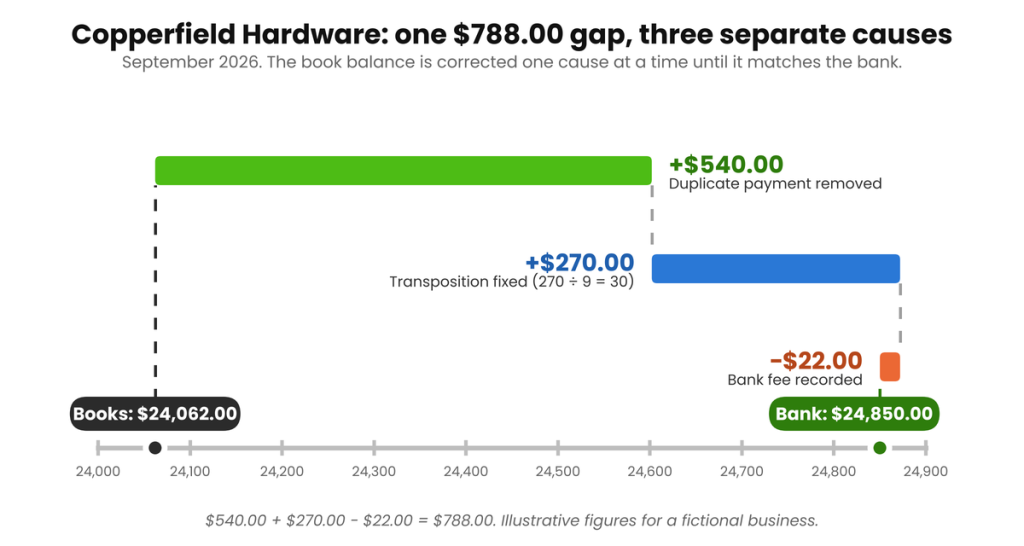
Copperfield’s bank statement showed an adjusted closing balance of $24,850.00 for September. The books, before any corrections, showed $24,062.00: a difference of $788.00. Working through the checklist above, three separate issues turned out to be stacked on top of each other:
| Issue found | Type | Correction |
| A $540.00 supplier payment had been imported and entered twice | Duplicate transaction | +$540.00 |
| A payment was recorded as $2,410.00; the actual amount was $2,140.00 (difference of $270.00, divisible by 9 exactly) | Transposition error | +$270.00 |
| A $22.00 monthly account-keeping fee charged by the bank had not yet been recorded | Unrecorded bank fee | -$22.00 |
| Net correction needed to the book balance | +$788.00 |
$540.00 + $270.00 − $22.00 = $788.00, and $24,062.00 + $788.00 = $24,850.00, matching the bank exactly. Each correction is independent of the others; the only reason they’re worth looking at together is that finding one doesn’t mean you’re finished, and it’s worth confirming the full $788.00 is explained before closing the reconciliation, not just the first cause you happen to spot.
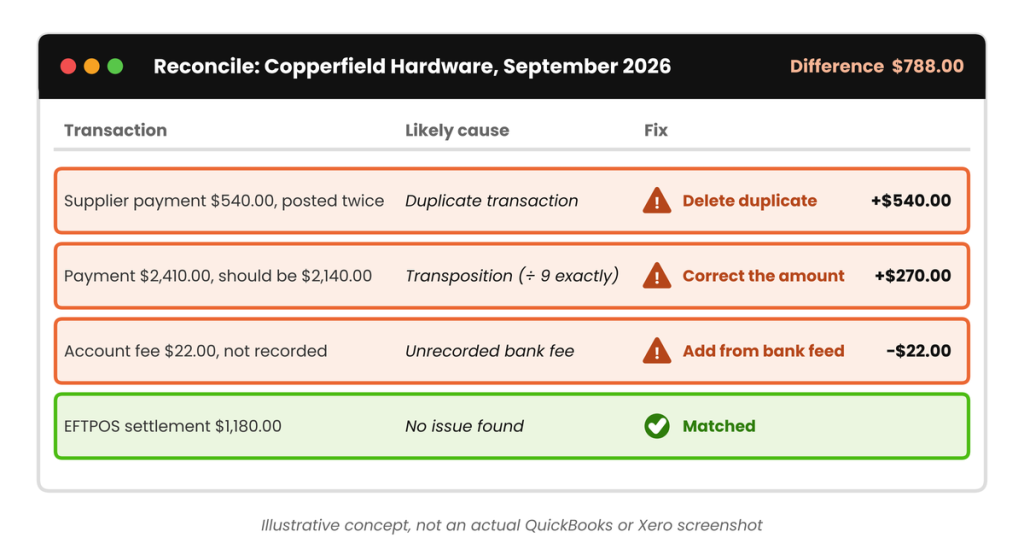
Illustrative concept diagram of Copperfield Hardware’s flagged transactions. Not an actual QuickBooks or Xero screenshot.
Fixing Each Discrepancy Type in QuickBooks Online and Xero
The diagnosis is the same regardless of software; the fix itself differs a little between QuickBooks Online and Xero, mainly because of how each platform treats a transaction that’s already been matched or reconciled.
Duplicate Transactions
In QuickBooks Online, duplicates most often come from bank feed imports running twice, or a transaction being entered manually and then matched incorrectly instead of matched to the existing one. Open the transaction, confirm it’s genuinely a duplicate against the bank statement (not two separate real charges of the same amount), and delete the extra one. Never edit a duplicate down to $0.00, since that leaves a $0.00 transaction cluttering the register instead of properly removing it.
In Xero, the same principle applies, but if the duplicate has already been reconciled, you’ll need to unreconcile or remove it first, covered in its own section below, since this is one of the more common places bookkeepers get stuck.
Missing Transactions
Check first whether the transaction simply hasn’t synced from the bank feed yet, especially around month-end when some banks batch overnight processing. If it genuinely never made it into your books, add it directly from the bank feed rather than typing it in manually where possible. That way the amount, date, and payee come straight from the source rather than from memory or a receipt that might not match exactly.
Transposition and Data-Entry Errors
Once the transposition test above has told you what you’re looking for, the fix is simply correcting the amount on the existing transaction to match the bank statement. Never delete and re-enter it unless the payee or date also needs correcting, since editing preserves the transaction’s history and any attached receipt or note.
Unrecorded Bank Fees, Interest, and Foreign-Exchange Charges
These are usually the easiest fix once found, because the bank statement already tells you the exact amount and date; you’re just adding the entry your books are missing. In both QuickBooks Online and Xero, add it directly from the bank feed as a new transaction categorised to bank fees, interest income, or foreign-exchange gain/loss as appropriate, dated to match the bank statement rather than the day you happened to notice it.
Opening Balance Discrepancies
If none of the above accounts for the full difference, check whether a transaction was added, deleted, or edited in a period you’d already reconciled and closed. Both platforms allow this by default unless you’ve set a closing date with a password, which is exactly why setting one is worth doing. It turns an accidental edit into a deliberate, logged decision rather than a silent change that shows up as an unexplained variance weeks later. This is part of the same discipline covered in our Month-End Close Checklist for Small Business (/month-end-close-checklist).
The Reconcile Discrepancy Report (QuickBooks) and Unreconcile vs. Remove & Redo (Xero)
QuickBooks Online has a purpose-built tool for exactly this problem. If your beginning balance doesn’t match when you start a reconciliation, QuickBooks displays an alert reading “Your account isn’t ready to reconcile yet” with a “We can help you fix it” link. This opens the Reconciliation Discrepancy Report, which tracks every change made to a transaction that was previously cleared or reconciled, even if that transaction has since been deleted. The report’s goal is a Total Discrepancy Difference of $0.00; once you reach that, you can proceed with reconciling normally.
Xero doesn’t have an identically named report, but it draws an important distinction between two different ways of undoing a reconciled item, and picking the right one matters:
| Action | What it does | When to use it |
| Unreconcile | Removes the link between the bank statement line and the transaction, without deleting either one. | The transaction itself is correct but was matched to the wrong statement line, or needs to be re-matched after a correction elsewhere. |
| Remove & Redo | Deletes the payment or receipt entirely. If it was linked to an invoice or bill, that invoice or bill reverts to outstanding, and the bank statement line returns to the reconciliation queue. | The transaction itself is wrong, a duplicate, a transposition, the wrong amount, and needs to be deleted and re-entered or re-matched from scratch. |
Getting this backwards causes its own problems: using Remove & Redo on a transaction that just needed re-matching means re-entering a payment from scratch and risking a new duplicate, while using Unreconcile on a transaction that’s genuinely wrong just leaves the wrong data in place with a broken link on top of it.
Beyond the Bank Account: Other Reconciliation Discrepancies Worth Knowing
Bank reconciliation is the most frequent kind, but the same diagnostic mindset, rule out timing, look for the exact difference, check for a doubled or transposed figure, applies to other balance-sheet accounts too:
- Accounts receivable and payable: a customer or supplier balance that doesn’t match their statement is usually a missing credit note, a payment applied to the wrong invoice, or a duplicate invoice, the same duplicate and missing-transaction logic above, just applied to a subledger instead of a bank account. See Reconciling Accounts Receivable and Payable (/reconcile-accounts-receivable-and-payable) for the full method.
- Loan accounts: a loan balance that drifts from the lender’s statement is most often interest being calculated or posted on a different schedule than the lender uses. Check whether your books are accruing monthly while the lender compounds daily, or vice versa.
- Intercompany balances: covered in full in What Is Intercompany Reconciliation, and Why It Matters. A persistent mismatch between two related entities’ books almost always traces back to a difference in the opening balance or interest rate each side is using, rather than a transaction error.
- Group-level balances: once you’re combining more than two entities, Reconciling Multi-Entity Group Accounts: A Framework covers the order of operations that keeps a single entity-level discrepancy from turning into a confusing group-level one. If you manage more than one related entity, it’s worth confirming a discrepancy is specific to one entity before assuming it’s an intercompany or consolidation issue.
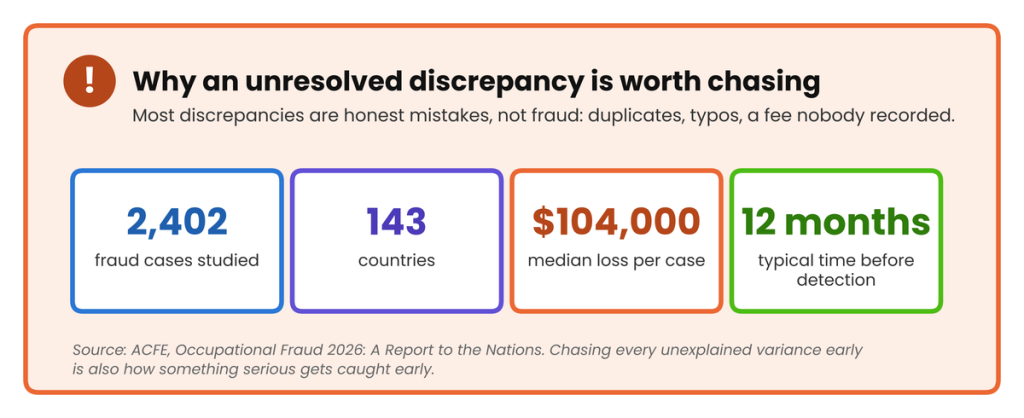
Journal entries and balance-sheet accounts generally follow the same rule: an unexplained variance almost always has a specific, findable cause. It’s a matter of narrowing down which account moved, in which period, and by how much, rather than assuming it’s unresolvable or immaterial.
Reconciliation Discrepancy Checklist
| ☐ | Rule out timing differences (outstanding cheques, deposits in transit) before treating the gap as an error |
| ☐ | Check whether the discrepancy divides evenly by 9 (transposition test) |
| ☐ | Check whether half the discrepancy matches a real transaction (reversed-sign test) |
| ☐ | Search transactions for the exact discrepancy amount (duplicate or missing item) |
| ☐ | Compare the bank statement for unrecorded fees, interest, or FX adjustments |
| ☐ | Run the QuickBooks Online Reconciliation Discrepancy Report, or check Xero for edits to a reconciled period |
| ☐ | Confirm the full discrepancy amount is explained, not just the first cause found |
| ☐ | Correct the transaction using the right method (edit, delete, unreconcile, or remove & redo) |
| ☐ | Set or confirm a closing date with a password once the period balances |
| ☐ | Document the cause of any non-trivial correction with a short note on the transaction |
FAQs
Why doesn’t my bank reconciliation balance by the exact amount of one transaction?
That’s actually the easiest case to solve. It usually means exactly one transaction is either missing from your books or duplicated in them. Search your recent entries for that exact amount before assuming anything more complicated is wrong.
What does it mean if the discrepancy divides evenly by 9?
It’s a strong signal of a transposition error: two digits swapped, like $2,410.00 entered instead of $2,140.00. This is a property of the base-10 number system: any error caused by swapping two adjacent digits always produces a difference that’s a multiple of 9.
Should I just force the reconciliation to balance in QuickBooks or Xero?
No. Adding an adjustment entry for the exact difference makes the reconciliation look balanced without actually fixing anything, and the real error, whatever it is, usually resurfaces later, by which point it’s much harder to trace back to its source.
What’s the difference between Unreconcile and Remove & Redo in Xero?
Unreconcile breaks the link between a bank statement line and a transaction without deleting either: use it when the transaction itself is correct but matched wrongly. Remove & Redo deletes the transaction entirely and reverts any linked invoice to outstanding: use it when the transaction itself needs to be re-entered.
How do I find a duplicate transaction in QuickBooks Online?
Duplicates most often come from a bank feed importing the same transaction twice, or a manually entered transaction that should have been matched to an existing one instead. Compare the date, amount, and payee closely; genuine duplicates usually share all three.
Can a miscategorised transaction cause my bank reconciliation to be out of balance?
No, not on its own. If a transaction was recorded to the wrong account but for the correct amount, your bank reconciliation will still balance: it’s a profit-and-loss accuracy issue, not a reconciliation one. Fix it by reclassifying the transaction, but don’t expect it to change your reconciliation difference.
How far back should I look if I can’t find the discrepancy in the current period?
Check whether anything was added, edited, or deleted in an already-reconciled prior period. This changes that period’s ending (and therefore the current period’s opening) balance without any obvious sign in the current month. QuickBooks Online’s Reconciliation Discrepancy Report is built specifically to surface this.
Copperfield’s $788.00, Three Ordinary Causes
Copperfield Hardware’s $788.00 discrepancy wasn’t one mistake. It was three ordinary ones stacked together, each findable in under a minute once you know what to test for. That’s the real skill in fixing reconciliation discrepancies: not memorising every possible error, but running the same short, ordered checklist every time so you’re testing for the likely causes first instead of searching at random.
Do that consistently, fix the cause rather than force the balance, and most discrepancies stop being stressful and start being routine.







[…] an unexplained variance into next month means starting the next close already behind. Our guide to Common Reconciliation Discrepancies, and How to Fix Them covers the diagnostic process in detail: duplicate transactions, transposition […]